> For the complete documentation index, see [llms.txt](https://anjia1.gitbook.io/cs/llms.txt). Markdown versions of documentation pages are available by appending `.md` to page URLs; this page is available as [Markdown](https://anjia1.gitbook.io/cs/git/advantages.md).

# Git 优势特性

免费、开源的分布式版本控制系统

> free and open source
>
> slogan: the stupid content tracker&#x20;
>
> SCM, source-control management, 源代码控制管理

优势特性：本地分支、暂存区域、多个工作流

* cheap local branching
* convenient staging areas
* multiple workflows

## 1. branching 和 merging

Git 的 branching model（分支模型），是真正让它区别于几乎所有其它 SCM 的功能。

<figure><img src="https://605825044-files.gitbook.io/~/files/v0/b/gitbook-x-prod.appspot.com/o/spaces%2FVUa7MztTVfoHQxXozBQf%2Fuploads%2FwECWewgmv8cmTZ1VdHIB%2Fimage.png?alt=media&amp;token=05b8da59-394c-4dc9-8829-b969518c2888" alt="" width="375"><figcaption></figcaption></figure>

Git 允许并鼓励我们有多个 local branch（本地分支），它们之间完全独立，可以自由地 creation, merging 和 deletion。

这就意味着，我们可以：

* 随意切换上下文
* 基于角色的 codelines：即生产环境一个branch、测试环境一个branch、日常工作n多小分支
* 基于 feature 的 workflow：即为每个正在开发的新 feature 创建一个新 branch
* 一次性实验：即可以创建一个 branch 然后随便玩

当向 remote repository 推送的时候，可以选择一个、多个、或者全部 branch。

## 2. small 而 fast

Git，几乎所有的操作，都在本地执行。此外，它是用 C 写的，且起初是为了在 Linux 内核上工作（可以有效地处理大型 repo）。

<figure><img src="https://605825044-files.gitbook.io/~/files/v0/b/gitbook-x-prod.appspot.com/o/spaces%2FVUa7MztTVfoHQxXozBQf%2Fuploads%2Fbqcm8AZZ0qR3V7qEp7ob%2Fimage.png?alt=media&amp;token=bf4a19e3-2b08-405b-8c49-bbdcb8c7ee1b" alt=""><figcaption><p>commit: files, images<br>diff: current, recent, tags<br>log: 50, all, file</p></figcaption></figure>

其中，Git 的 initial clone operation（初始克隆操作）比较慢，这是因为 Git 是在下载整个历史记录，而不仅仅是最新版本。

值得一提的是，即便 Git 存了项目中每个 file 的每个 version，但客户端数据的大小并没有大多少。这说明了 Git 在 compressing 和 storing 数据的高效率。

## 3. 分布式

任何分布式 SCM 的最好特性之一，就是它是分布式的（distributed）。即：不需要 checkout 源码的 current tip，而是 clone 整个 repo。

这就意味着，每个用户基本上都有 main server 的完整备份。事实上，Git 不存在单点故障，除非 repo 只有一个副本。

此外，分布式特性 + 分支系统 -> 可以轻松实现任意工作流程。常见的 Git workflow 有：

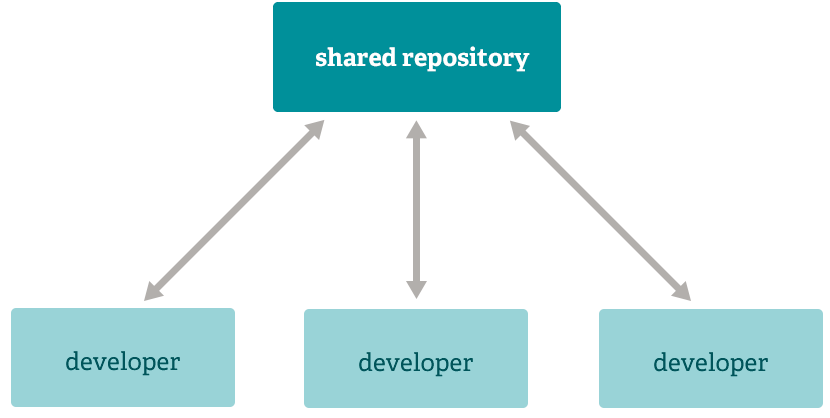
**集中式的**：如果自上次 fetch 以来有人推送，Git 将不允许 push。

<figure><img src="https://605825044-files.gitbook.io/~/files/v0/b/gitbook-x-prod.appspot.com/o/spaces%2FVUa7MztTVfoHQxXozBQf%2Fuploads%2Ft2glTSUBVPLsbp2kh055%2Fimage.png?alt=media&amp;token=e1ae6cee-fa12-4a12-b392-f3bab1036146" alt="" width="375"><figcaption></figcaption></figure>

**集成经理**：一个单独的人来 commit 到 blessed repo；而其他 developers 从该仓库 clone，然后 push 到自己的独立 repo；然后那个集成经理 pull 大家的 changes。这是 open source 和 GitHub repo 中常见的开发模型类型。

<figure><img src="https://605825044-files.gitbook.io/~/files/v0/b/gitbook-x-prod.appspot.com/o/spaces%2FVUa7MztTVfoHQxXozBQf%2Fuploads%2F2yZICiN1TACFOtUu0R1J%2Fimage.png?alt=media&amp;token=eb8c997f-0d4b-4522-a6c2-112e3451bcba" alt="" width="375"><figcaption><p>blessed repo, “受祝福的”存储库</p></figcaption></figure>

**独裁者和中尉**：一些副手负责项目的特定子系统，他们 merge 与该子系统相关的所有 changes；另一个集成者只可以从他的副手那里 pull changes，然后 push 到 blessed repo；而每个 developer 都从 blessed repo 那 clone。对于更大规模的项目，比如 Linux 内核（kernel），这样的 development workflow 通常是有效的。

<figure><img src="https://605825044-files.gitbook.io/~/files/v0/b/gitbook-x-prod.appspot.com/o/spaces%2FVUa7MztTVfoHQxXozBQf%2Fuploads%2FNh45ma4IgEYWN29jlUwR%2Fimage.png?alt=media&amp;token=f2dedca1-b5ee-40db-add2-271d1638d27a" alt="" width="375"><figcaption><p>子系统+总负责人</p></figcaption></figure>

## 4. 数据保障

Git 使用的 data model 可确保项目每个部分的加密完整性（cryptographic integrity）。

每个 file 和 commit 都会进行 checksum（校验和），并在 check out 时通过 checksum（校验和）来进行检索。除了我们输入的确切内容之外，不可能从 Git 中获取任何内容。

此外，在不更改 commit ID 的情况下，也不可能更改 Git repo 中的任何 file, date, commit message 以及任何其它 data。 这就意味着，如果我们有一个 commit ID，我们不但可以放心项目与提交时完全相同，也能确保其 history 没有任何 change。

大多数集中式版本控制系统，默认不提供这种完整性。

## 5. staging area, 暂存区

与其它系统不同，Git 有称为 staging area（暂存区）或 index（索引）的东西。 这是一个中间区域，可以在完成 commit 之前对其进行格式化和审查。

<figure><img src="https://605825044-files.gitbook.io/~/files/v0/b/gitbook-x-prod.appspot.com/o/spaces%2FVUa7MztTVfoHQxXozBQf%2Fuploads%2FnO3iloF7uiCfjHGAYN4j%2Fimage.png?alt=media&amp;token=48534827-e965-471d-a2f4-1d82e6ce79c5" alt="" width="343"><figcaption><p>staging area</p></figcaption></figure>

Git 与其它工具的区别之一是，它可以快速 stage（暂存）部分 files 并提交它们，而无需 commit 其它修改的文件。这允许我们仅 stage（暂存）已修改文件的部分内容，便于我们将同一文件上的两个逻辑不相关的 modifications 分批 commit。

当然，给 commit 添加 `-a` 选项，可以忽略此功能，即可将对所有 files 的所有 changes 都 add 至 staging area。

<figure><img src="https://605825044-files.gitbook.io/~/files/v0/b/gitbook-x-prod.appspot.com/o/spaces%2FVUa7MztTVfoHQxXozBQf%2Fuploads%2FidHF2Bcmn9llk3xW3BbX%2Fimage.png?alt=media&amp;token=d5026421-85e6-4d3d-8aed-06018983bbac" alt="" width="338"><figcaption></figcaption></figure>

> 没懂，不是先 add 到 staging area，再 commit 到 repo 么？&#x20;
>
> 咋感觉应该是 git add -a 呢？